Buy on itch.io

Pages

Sunday, April 5, 2015

Dungeon Colony 0.2.6.12 (+) an Ester Egg!!

Grunt Minions!

I've just uploaded a new version. This one includes all the work I've done on Dungeon Rooms so far! But first, there's an easter egg too. I've added a new creature that is joining the spider family. This one is the Spider Queen!

The Spider Queen is 4 times the size of it's fighter class. And it is much much stronger and faster. So far you can add the spider from the Level Editor. Later, there will be levels with the spider in it:


Check out this gif animation of the same level:


Rooms Part 3:

I've continued to work mostly on Rooms. (Check out the last two posts (One & Two) if you want to read more about the beginnings of rooms.) There are now 3 types of rooms, I will add more types later, but the 3 types that I start with are the most important rooms to keep the economy of your colony going. Every other room type thereafter is an add-on. Those 3 rooms are the Lair, Pantry and Treasury: 


The Lair is the room where your a minions will live. Minions will sleep in their room and use it to store their goods. The pantry is where minions get fed and the treasury is where they get their wage. 
In today's release I've added the logic to place objects inside a room. What that really means is that any objects that are located in a room tile, will be considered inside that room. Having the ability to track what objects are in a room allows me to set room requirements to guide the player into crafting certain furniture items to be placed in the room. For example, the lair will need a bed for the minion to sleep on and a chest to store gold. 

And here is the summary of changes in version 0.2.6.12:

- Adds Spider Queen to the Level Editor.
- Begins with Dungeon Rooms. Work in Progress:
- Creates 3 new rooms: Lair, Pantry, and Treasury.
- Can create, delete, merge and split rooms.
- Renders rooms on map if the Room Tool Button is selected.
- When hovering the mouse over the map, then the color of the room shows (faintly).
- When-ever a minion walks over a Lair room without owner, and if he is owner-less too, then he becomes the new owner automatically.
- Adds logic to remove room owners when a room is deleted or when the owner dies.
- Saving and Loading Rooms is possible.
- Shows room info when hovering.
- Shows room colors on brush when painting rooms.
- Adds inRoom Room property to all objects.
- Adds ability to add objects to rooms.
- Adds ability to assign a room a specific object requirement.
- Sets requirements for the Lair room.
- Removes invoice game activation option since it never worked in first place.

Tuesday, March 31, 2015

Dungeon Colony Rooms - Ownership

I've introduced some of the new room features in a previous blog post. Since then I've continued on rooms and built the logic to let minions take ownership of the room Lair type. All a minion needs to walk on a tile that is defined as the room type Lair and if that room is still vacant, the minion will automatically become owner of it. I will add a way to remove owners as well. Other room types, such the Pantry or Treasury do not need owners. They have different functions such as managing food and gold reserves for the entire Dungeon.

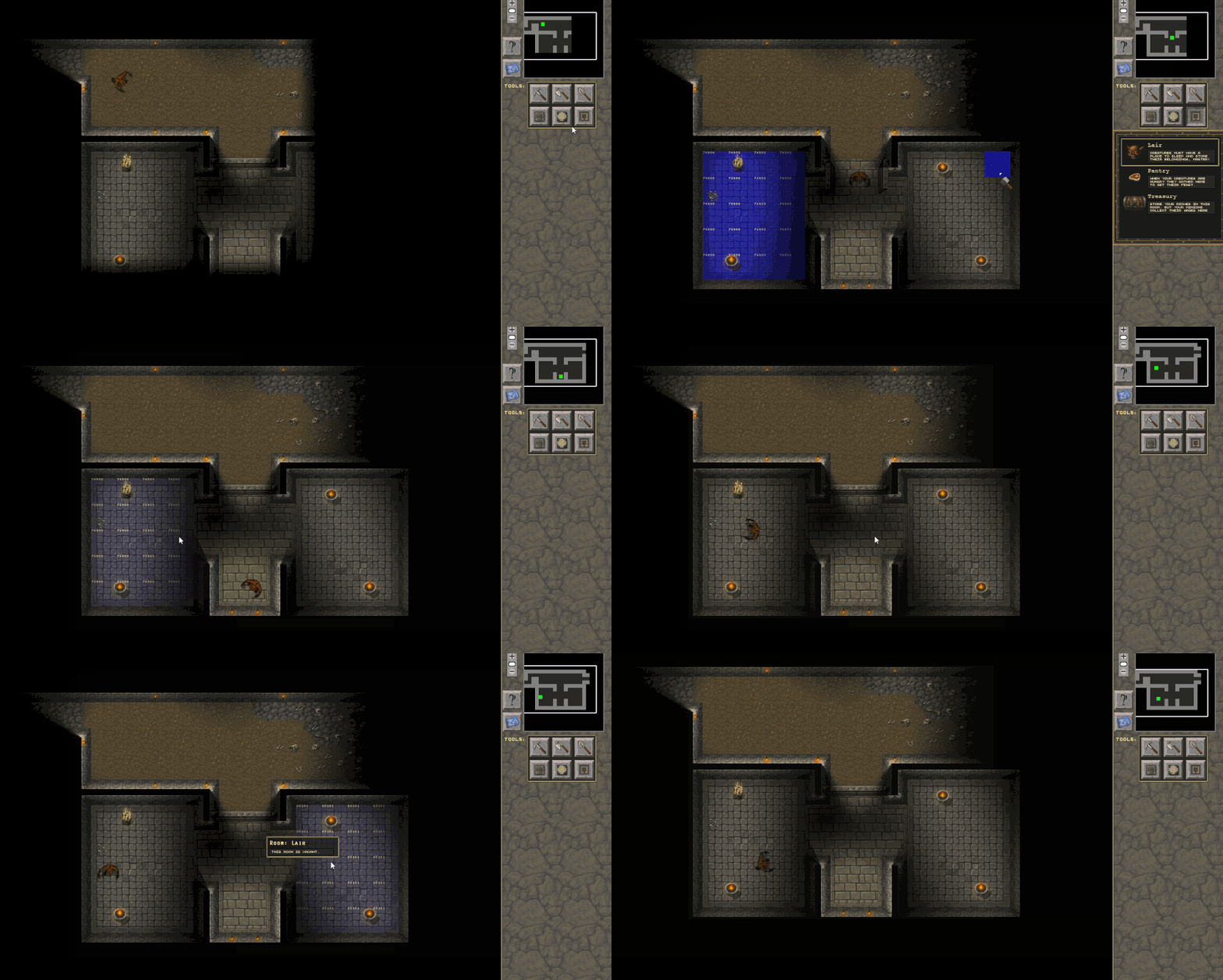
You can see in the following Gif animation some of the new features in action:

  1. I'm first setting up two Lair rooms by selecting the lair room button on the right and then drawing the room in. (Lair rooms have the color blue)
  2. Then I'm sending a minion in the left room; as soon as he enters the room tile, he becomes owner.
  3. The other new feature is the room info. You can see that I de-selected the room tool button and the blue color showing the room area disappears. However, you can still see the room designation in a lighter blue when hovering the mouse over the room. After a few milliseconds, a popup also gives information about the room. In this case whether the room has an owner or not. 

What's not shown in the gif above is some additional info when hovering over a room. If the lair has an owner, the owner will be highlighted, so that you can find out quickly where the owner is.

... Next: I'll start building the logic that determines what a minion can do in a room. 

Sunday, March 29, 2015

Dungeon Colony Rooms - A first look

Minions!

I've started designing Rooms for Dungeon Colony! This is where things get interesting. The main purpose of rooms is determined by their type. For now, I'm introducing and testing three room types: Lair, Pantry, and Treasury. These rooms all play a fundamental role in the up-coming economy update. The Lair will be the room that your creatures sleep in. Your minions can claim a room and become the owner of it. I'm planning to assign ownership by walking into a room. Currently, only the Lair can be owned by your creatures. The other rooms are common or belong to your Dungeon Master by default (the treasury of course).

As a minion takes ownership of a room, it becomes his hub for anything that he needs. That includes sleep, food, potions, weapons and gold of course. To store all of that, your minion will ask you for furniture... That part I am going to work on soon. Right now I'm finishing up the UX features. That is the way that you can create room of different room types. As well as how the UX responds to you when you try to place a room or remove a room again. For example, I've built in features that allows you to merge existing rooms of the same type, or splits rooms into two (or more), while reassigning ownership of any previous room owners. Anyway ... if that makes no sense, I think a small demo is nicer to show some of it in action:


Placing rooms is just like drawing in a paint program: You choose the room type, which will draw the color of the room to show you where the room dimensions are. If you turn the Room-Button off, the room colors will be hidden. For development purposes I show the room ID, so that I can merge or split rooms correctly (see red pantry room in demo). I will reveal more about rooms as features become available.

Wednesday, March 25, 2015

Dungeon Colony 0.2.6.0

Minions!

I'm making good progress on the final major game engine features: Creature behavior and creature economy. In this version update (v0.2.6.0) I'm extending how abilities are used to control your minion behavior.

There are 9 new abilities which range from mining ore, lumbering wood to transporting and building objects. Now, the player can control what orders a worker will perform and which one he will ignore. The following gif animation shows how you can simply turn on and off certain abilities.


You ask what is the benefit for that and why should I care??? A lot of feedback I've received asked me to allow the player control over what minions do. The engine used to assign orders to your workers on a first come first serve basis. So if you had 10 activities pending to lumber wood, whenever a minion would become free to perform this job, he would take on the job and carry it out.

With the new system, you can designate which minions lumber wood, which mine, dig dirt, collect water, etc. This way, you could limit how many of your workers lumber wood, while others stay back to mine fore ore. By default a minion will carry out all of these abilities, but you can choose to turn them off when you want. In future game updates, workers will be able to learn new abilities. But that's not part of this release yet. :)

Friday, March 20, 2015

Dungeon Colony Version 0.2.5.0

Minions!

It's great to finally write a blog post, I've been waiting for this day for a long time and, for Great reasons, I took time and put the Dungeon Colony machine on hold for a while to welcome new life into this world. Now that I returned I continued development and I want to tell you that there is a new release available today. It adds new features both to the engine as well as the game server:

The Campaign Engine:

The pieces are starting to come together and connect into a full Campaign Engine. It loads levels, integrates into the game editor, connects levels to the campaign map, manages units travelling from one destination to the next and puts your units onto the playing map, when the player selects a game. This means that your units travel with you, including their experience and items they may be holding. Currently I'm working on connecting loose ends to complete the playing experience of a full game from start to finish.

Runes: 

At the same time, I've continued on level design. One of the larger level design elements is about runes. Your Dungeon Master get's it's magic spells from ancient runes which his ancestors have left scattered around the land. He has one of the pieces in his possession, passed down to him from generations, but he must find and collect the rest to unleash its full power. The first rune gives him the spell to summon a minion into the world. The minion's soul is bound to you and the weak power of the rune doesn't allow you to summon more than just that one minion. There are, however, other ways to get more minions in the game.

The Dungeon Master has a special button that opens up the Rune Collection window (screenshot below). Any runes that the Dungeon Master collects will be shown in this window. The following screenshot shows the windows at different stages of assembly. Each time the Dungeon Master finds a new piece the player may try to put them together to craft the next assembly:


Game Server:

The game engine communicates with a server where players can store their game. During alpha development this was (and still is) the only way to save games. Its serves the purpose of debugging and understanding issues players may have. I'm currently looking for a cloud solution for game saves and may use AWS for this, let me know if you recommend another solution and why. One of the biggest upgrades I've made to the server is improving email communication. It was a disaster before and I lost too many emails in the process. This should not happen any longer.

New in version 0.2.5:

- Dungeon Master can now carry certain special items.
- Added new Rune Stone Fragments. Fragments can be combined into one full assembly.
- Further improves campaign map logic for units traveling between locations.
- Enables campaign save/load to server.
- Adds button in settings to allow you to delete & restart a campaign game.
- Adds Gold Reserves to Campaign Game Map.
- Adds Legend to Campaign Map.
- Adds next/previous buttons to scroll through this list.

Sunday, January 4, 2015

Dungeon Colony has been greenlit!

Hello Dungeon Masters!

Dungeon Colony has been Greenlit!

I have some great news: Dungeon Colony has been Greenlit! What a good way to start the new #indiedev year. This milestone is fantastic and highlights just what an amazing journey it has been to create the game of my dreams so far. Progress has been good and steady and I'm working towards a beta launch hopefully sometime this year.

Dungeon Colony isn't available in the store just yet. Before it gets there, I need to make some changes to the game and implement some Steam code. There are also a few business related obstacles that I need to complete. So stay tuned for more updates on that.

In case you are curious, I started my Greenlight page in March and I was greenlit mid December 2014. I surely didn't do much marketing (except for game updates) and am happy that the community decided on its own to vote the project into the store.

Dungeon Colony version 0.2.4.0 out now.

I have made great progress on the campaign map which includes a lot of functionality that allows players to navigate the map and move maps from one level to the next.

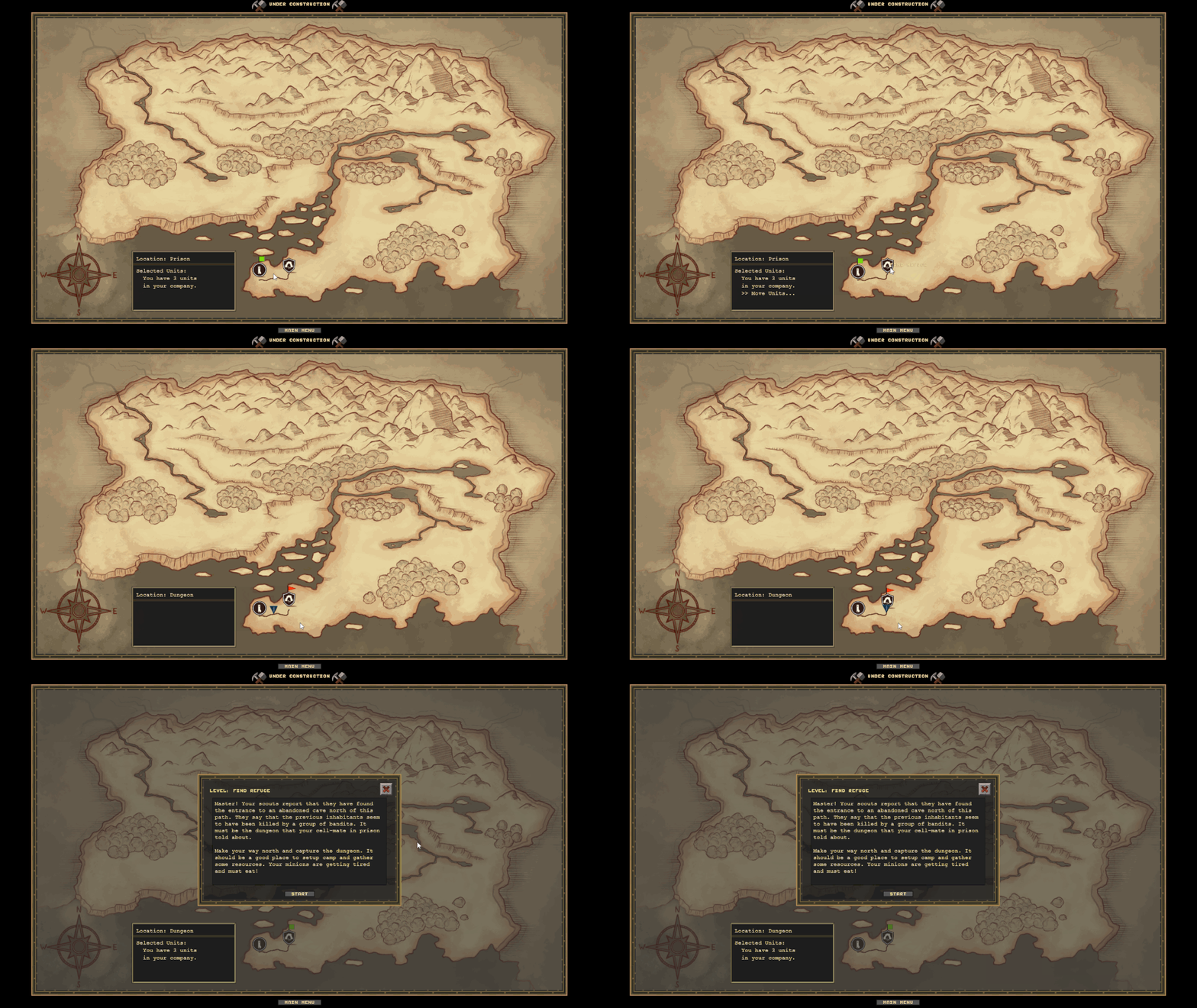
The following gif shows the first 2 map icons and the road on which your units travel:


As you complete levels, more roads and destinations will be added to the map. You will carry over your units from level to level, keeping any experience they have earned. This feature is still in development.

Here is the complete list of changes in v0.2.4.0:

  • Adds notification icon when new comments are available to the player.
  • Splits Campaign Map into 4 smaller maps to fix bug with older GPUs.
  • Reads path locations and destinations from maps.
  • Adds Map Icon for Player Units.
  • Adds Ability to move player units from one location to another.
  • Adds Spawn Points for various unit types.
  • Allows setting count, direction and type of unit to spawn on map.
  • Allows placing spawn points from editor using a new Spawn Points Window.
  • Adds logic to transfer map units to level.
  • Adds Campaign Development Progress Window.


Friday, December 12, 2014

Better precision selecting objects, Comments on suggestions, a new help window and more...

Update: I've uploaded a fix to a bug that crashed the game for many players when you tried to use the new selection feature mentioned below. New Version: v0.2.3.35.


Today's release (v0.2.3.33) brings changes to the game engine and the website:

1. Better precision when selecting items on the map

One frequently mentioned issue had to do with the way you select items that are overlapping each other. The problem was that you wanted to select some loot from the ground, but there was also another object or creature in the way. Before, you wouldn't be able to just select that object. Instead would have to move the creature out of the way first. That would become a big issue, if there were more than 2 or 3 items or creatures over the same spot.

To solve this problem, you can now use the Control key with the Mouse in order to select and cycle through each item overlapping one another. (This works with both Left and Right Control +Left Mouse).

Once you press Control, you will see a little yellow indicator around the mouse, letting you know that you are in select mode. There is a priority built in which determines the type of item that is selected first:

  1. Your Units.
  2. Enemy Units.
  3. Neutral Units. 
  4. Objects.
It wasn't so easy to demonstrate,  but the following gif kind of shows how i'm cycling through 2 units and mushrooms that are on the ground, depending if the creature is in the collision rectangle determines if it is going to be selected and cycled. You can also see that I'm pressing Control because of the yellow circle that appears: 


It is also worth mentioning that the selection cycle does remember the items it has selected previously. It does so by storing a reference to each item or creature. This is helpful when an item is at some point in the list but then at another point is not any longer. This can become apparent in the above example when you see a minion walk in and then out of the area where I am trying to select. So what that means is that the order in which the items are selected and cycled through is preserved, even if a minion walks in and out of that selection area. 


2. Comment on suggestions

The built-in feedback system allows players to submit feedback, suggestions, bugs, and more. Today, I am adding the ability to write comments on each post that is submitted. This allows you to discuss with other players each post. Depending on how well this works, I will probably add more functionality in time. Here is a screenshot showing the comments section to the right: 


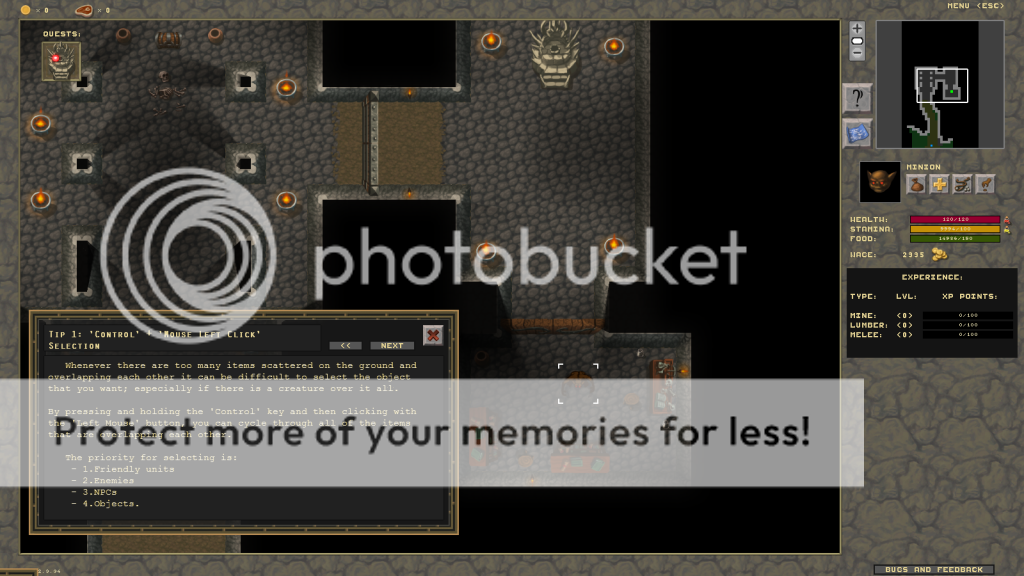
3. New Help Window

There used to be a help window that explained how to play dungeon colony. This was very old and had outdated information in it. I have updated the help window to use some of the newer features of the engine and included new tips. To access the help window, click on the question mark button in the right menu:


4. Website Updates

The website has also some new updates. The contact page has more information about development and the shopping cart has 4 new ways to buy or support the game. You can now even Give What You Want to send us a contribution to help keep development going. 


Here is a summary of all the changes in version 0.2.3.33:
  • Adds ability to comment on any feedback.
  • Comments include comment, date, user, and optional response by developer.
  • Improves precision of selecting objects and creatures on the map.
  • Adds Control +Mouse click to cycle through objects and creatures overlapping each other.
  • Improves Input Class.
  • Changes Font on most Text Areas to use Currier New.
  • Increases the quest description text area size to fit text with the new increased font.
  • Reworks the Help windows, showing new tips on how to Play Dungeon Colony.
  • Adds new Purchase options to the web-site.
  • Updates the Contact web-site. 
  • Fixes bug when saving Levels without description.
  • Fixes issue with attacking when creatures are already facing each other.
  • Fixes issue with Enemies being stuck on map.